

By purchasing this product you agree to the End User License Agreement (EULA).
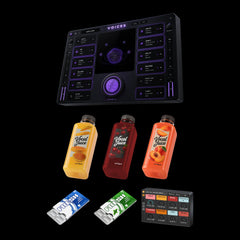
VOICES by zerrro is an all-in-one vocal plugin that turns a dry vocal into a finished, wide and polished one – with backing voices built from your own lead.
Press ZERRRO MAGIC and play your vocal: it dials in EQ, compression, de-essing, tuning, delay and reverb for you. Twelve modules, from GATE and TUNE to ORBIT, DELAY and REVERB, are one click away when you want more.
Perfect for Pop, Hip-Hop, R&B, House, EDM and more.
Due to legal and insurance restrictions, this product is not available for purchase by customers located in the United States of America or Canada.

Sound Examples
Same vocal, perfectly in sync. Switch between dry and VOICES and try the presets.
ON
Tap DRY or WET – or VOICES – to switch instantly.

Key Features
ZERRRO MAGIC:
Press the button and play your vocal. After a few seconds MAGIC sets EQ, compression, de-essing, the key, delay and reverb in time with your track, and matches the level.
Backing Vocals from Your Lead:
ORBIT builds up to four extra voices from your own vocal – in key and spread across the stereo field. 16 voicings from subtle doubles to huge choirs.
Tune & Alter:
Pitch correction from natural to hard tune with automatic key detection. Shift pitch and formant, go full robot or play the pitch via MIDI.
A Complete Vocal Chain:
12 modules in one plugin: GATE, EQ, COMP, DE-ESS, TUNE, ALTER, DRIVE, ORBIT, DELAY, REVERB, POST EQ and LIMIT. Switch them on and drag them into your order.
Safe with Loud Vocals:
INPUT AUTO keeps very hot recordings in check before they hit the chain, with IN and OUT meters on both sides.
56 Presets + Your Own:
Choirs, harmonies, doublers, hard tune, robots, space and lo-fi in 10 categories, plus over 150 module presets. Save your own and take them to every project.
What’s Inside
ZERRRO MAGIC
One button that listens to your vocal and dials in the whole mix. Everything it sets stays open for you to change.
TUNE & ALTER
Pitch correction from natural to hard tune in your key, plus pitch, formant, robot and MIDI modes.
ORBIT
Up to four backing voices from your lead, in thirds, fifths or octaves, placed around it in stereo.
MIX
GATE, EQ with a live spectrum, COMP with six characters, DE-ESS, POST EQ and LIMIT: clean, even and loud.
SPACE
DRIVE in warm, edgy and FX flavours, 20 delays and 24 reverbs – from slapback to deep space.

Everything on one screen
Your voice sits in the middle as a planet in space that moves with every note. Around it the twelve modules, six on each side: switch them on and off, drag them into a new order, click one to open it.
The big ZERRRO MAGIC button under the screen is the heart of VOICES: press it, play your vocal and it dials in the mix. The more modules work, the brighter everything glows – with nothing on, VOICES goes dark.
Eight dark colour themes, IN and OUT meters, a preset browser with favourites and a freely scaling window.
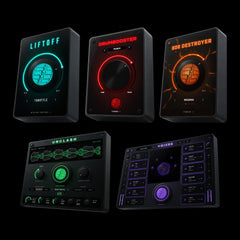
Save money with our Bundles!


System Requirements
macOS
Compatible with macOS 10.13 (High Sierra) or higher
Universal binary: runs natively on Apple Silicon (M1/M2/M3/M4) and Intel
Available plugin formats: AU and VST3
The installer is code-signed and notarized by Apple for a smooth and secure installation process
Compatible with most modern DAWs (VST3 / AU). System requirements apply
Windows
Requires Windows 10 or Windows 11, 64-bit – x64 and Windows on ARM (ARM64)
Available plugin format: VST3
The installer is code-signed and installs to the standard system VST3 directory for automatic DAW detection
Compatible with most modern DAWs (VST3 / AU). System requirements apply
Related Products


Frequently asked questions
What exactly does VOICES do?
zerrro VOICES is a complete vocal plugin: it cleans, tunes, alters and mixes your vocal, builds backing voices from it and puts it in space with delays and reverbs. Twelve modules in one window – and one button, ZERRRO MAGIC, that dials in the mix for you.
What does ZERRRO MAGIC do?
Press the button and play your vocal. After about eight seconds of singing MAGIC has heard enough: it sets the EQ, compressor and de-esser, a gate if there is steady noise, the key for TUNE, a touch of drive, delay and reverb in time with your track, and matches the output level. Everything stays open, so you can change any part afterwards.
What can I use VOICES on?
Lead vocals, backing vocals, rap, spoken word and vocal chops. TUNE, ALTER and ORBIT follow one voice at a time, so use them on single vocal tracks; the mix modules work on anything.
Which DAWs are supported?
Any DAW that supports VST3 (Windows/macOS) or AU (macOS) will work.
This includes: Ableton Live, FL Studio, Logic Pro, Cubase, Studio One, Bitwig, Reaper, Pro Tools (via wrapper), and more.
How do I install the plugin?
Your download includes a ZIP file containing the installers for macOS and Windows.
- macOS: Run the .pkg installer (AU + VST3).
- Windows: Run the .exe installer (VST3, x64 + ARM64).
The plugin will appear automatically in your DAW after installation.
Does the plugin introduce latency?
Yes, about 47 ms: TUNE, ALTER and ORBIT need to hear a moment of your voice ahead to shift it cleanly. VOICES reports it to your DAW, which compensates it automatically, so everything stays in time on playback. For recording through it live, use your DAW’s low-latency monitoring.
Is my payment secure?
Yes. Our store is powered by Shopify, one of the most secure e-commerce platforms out there.
All payments are SSL encrypted, and you can pay safely using your preferred method.
I didn’t get my download email, what should I do?
Please check your spam or promotions folder first.
If it’s not there, just drop us a message. We’ll resend your download link asap.
help@zerrromusic.com
What if the plugin doesn't show up in my DAW?
Try these steps:
- Restart your DAW
- Rescan your plugin folders and check if you use the right ones in your preferences of your DAW
- Make sure you installed the correct version for your OS
- On macOS: ensure AU/VST3 loading is enabled in your DAW
If you still have issues, contact support. We try to respond quickly: help@zerrromusic.com