

By purchasing this product you agree to the End User License Agreement (EULA).
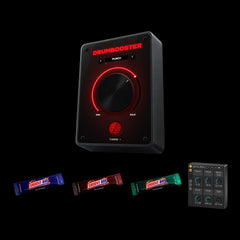
DRUMBOOSTER 2.0 is a one-knob drum enhancer that makes your drums hit harder and cut through the mix instantly – now completely rebuilt.
Pick a preset, turn up the big knob and get modern, mix-ready punch. Open TUNING for six macros, five characters and LOW / MID / HIGH band control – from subtle impact to full-on smash. And your old projects still sound exactly the same.
Perfect for EDM, House, Tech House, Techno and more.
Due to legal and insurance restrictions, this product is not available for purchase by customers located in the United States of America or Canada.

Sound Examples
Same loop, perfectly in sync. Switch between dry and DRUMBOOSTER and try the presets.
ON
Tap DRY or WET – or the DRUMBOOSTER – to switch instantly.

Key Features
One-Knob Control:
Instant punch, clarity and energy with a single Boost knob.
Rebuilt Sound Engine:
New in 2.0: 4x oversampling, cleaner through the sweet spot, the level stays matched as you turn.
TUNING Panel:
Fold out six macros – PUNCH, SNAP, BODY, SMASH, DRIVE, TIGHT – plus WIDTH, OUTPUT and KICKSTART for a random new sound.
LOW / MID / HIGH:
Choose which frequency bands get boosted. The rest passes through untouched.
16 Presets + Your Own:
From subtle impact to full-on smash, with a save system for your own presets.
Your Old Projects Stay the Same:
Projects made with 1.x load the matching V1 preset with the original 1.x sound.
Five Characters
CLEAN
Modern and transparent. Punch without colour, great for kicks and full drum buses. Presets: PUNCH, TIGHT, KNOCK, AIRY.
TAPE
Rounded hits, glue and a warm low bump. Analog-style warmth for electronic and acoustic drums. Presets: WARM, GLUE, VINTAGE.
TUBE
Thick harmonics and a slower compressor, so the body blooms. Presets: THUMP, ROOM, FULL BOOST!!!!!!!
CONSOLE
Bus compression with a hard knee. Punch and bite for snares, claps and busy mixes. Presets: SNAP, SMASH, CRACK.
CRUSH
Lo-fi sampler grit: fewer bits, a lower sample rate and pumping. Presets: BOOM BAP, SLAM, NITRO.

Everything on one screen
Most of the time you only need the big knob: pick a preset, turn it up and your drums hit harder. The red light beam shows how hard you push, and near the top the knob starts to tremble.
Open TUNING when you want more: six macros for punch, snap, body, smash, drive and tight, the LOW / MID / HIGH band buttons and five characters, plus WIDTH, OUTPUT and KICKSTART for a random new sound. Save your favourites as presets and take them to every project.
The window scales freely, and when the knob sits at 0, everything goes dark.
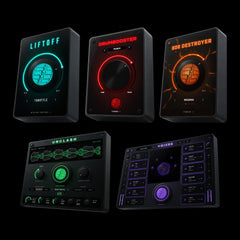
Save money with our Bundles!


System Requirements
macOS
Compatible with macOS 10.13 (High Sierra) or higher
Universal binary: runs natively on Apple Silicon (M1/M2/M3/M4) and Intel
Available plugin formats: AU and VST3
The installer is code-signed and notarized by Apple for a smooth and secure installation process
Compatible with most modern DAWs (VST3 / AU). System requirements apply
Windows
Requires Windows 10 or Windows 11, 64-bit – x64 and Windows on ARM (ARM64)
Available plugin format: VST3
The installer is code-signed and installs to the standard system VST3 directory for automatic DAW detection
Compatible with most modern DAWs (VST3 / AU). System requirements apply
Reviews
What producers say
5.0
Exactly the secret sauce i searched for tasty drums!🤤
You guys are awesome ❤️
Keep up the good work!!
Greetings from Germany
When I turn it full there’s too much distortion but 50-70% is perfect!
wow makes my drums hit sooo hard now. Really wwell done.
Damn, the new update is a game changer!
Worth it af
love from Indonesia, really good plugin <3
Really worth it
Read all 7 reviews
-
JanHurn11 Dec 2025
Exactly the secret sauce i searched for tasty drums!🤤
You guys are awesome ❤️
Keep up the good work!!
Greetings from Germany -
Lex J seem12 Jun 2025
When I turn it full there’s too much distortion but 50-70% is perfect!
-
Tom mc12 Sep 2025
wow makes my drums hit sooo hard now. Really wwell done.
-
Marc2 Oct 2026
Damn, the new update is a game changer!
Worth it af -
Arif N12 Aug 2025
love from Indonesia, really good plugin <3
-
MJBEATS12 Jul 2025
Really worth it
-
Nick A12 May 2025
Nice one.
Thank you!
Your review is in and will appear here after a quick check.
Thank you! Your review will appear after a quick check.
Your review could not be sent. Please check your entries and try again.
About our reviews: we check every review before it goes live and publish critical ones too – we only remove spam and insults. “Verified buyer” means the reviewer bought this product in our shop. Reviews from before October 2026 were collected with Judge.me.
Related Products


Frequently asked questions
What exactly does DRUMBOOSTER do?
DRUMBOOSTER makes your drums hit harder: transient shaping, EQ, compression, saturation, stereo width and bass-mono in one chain. Turn one knob and everything moves together.
In version 2.0 you can open TUNING to shape six macros, pick one of five characters and choose which frequency bands (LOW / MID / HIGH) get boosted.
I already use DRUMBOOSTER 1.x – what happens to my projects?
Nothing changes for them. DRUMBOOSTER 2.0 replaces 1.x and opens your old projects with the matching V1 preset – the original 1.x sound, same knob position. Your automation keeps working, too.
Does DRUMBOOSTER only work on drums?
No. While it’s optimized for electronic and acoustic drums, it also works great on bass tracks, percussion, loops, synth drums, and even parallel buses. Just experiment and you’ll be surprised how versatile it is.
Which DAWs are supported?
Any DAW that supports VST3 (Windows/macOS) or AU (macOS) will work.
This includes: Ableton Live, FL Studio, Logic Pro, Cubase, Studio One, Bitwig, Reaper, Pro Tools (via wrapper), and more.
How do I install the plugin?
Your download includes a ZIP file containing the installers for macOS and Windows.
- macOS: Run the .pkg installer (AU + VST3).
- Windows: Run the .exe installer (VST3, x64 + ARM64).
The plugin will appear automatically in your DAW after installation. DRUMBOOSTER 2.0 installs over 1.x – no need to uninstall anything.
Does the plugin introduce latency?
Only a tiny one: 6 samples (about 0.1 ms at 48 kHz), which every modern DAW compensates automatically. That’s the price of 4x oversampling – you won’t notice it, even when tracking live.
Is my payment secure?
Yes. Our store is powered by Shopify, one of the most secure e-commerce platforms out there.
All payments are SSL encrypted, and you can pay safely using your preferred method.
I didn’t get my download email, what should I do?
Please check your spam or promotions folder first.
If it’s not there, just drop us a message. We’ll resend your download link asap.
help@zerrromusic.com
What if the plugin doesn't show up in my DAW?
Try these steps:
- Restart your DAW
- Rescan your plugin folders and check if you use the right ones in your preferences of your DAW
- Make sure you installed the correct version for your OS
- On macOS: ensure AU/VST3 loading is enabled in your DAW
If you still have issues, contact support. We try to respond quickly: help@zerrromusic.com